Header bar
Gtk.ToggleButtonaction-name: app.chatMarkwork began as a single GtkSourceView in a GTK 3 window that hid Markdown syntax. Five days later it is a GNOME app on GTK 4 + libadwaita with tabs, panels that fold on narrow windows, dialogs that return a Promise, GSettings, list models, .ui templates, translations, and a Flatpak manifest. This page follows that path commit by commit. For each Markwork feature it names the GTK pieces it uses and explains why. It also covers the third of the code that never touches GTK, which is why most of the app can be tested without a window.
Because this page is about building interfaces, every chapter draws the widgets it talks about: Adwaita-style mock-ups you can click, resize, and inspect, with the GTK type of every part named next to it. Start with the window anatomy, which maps each region of Markwork's window to the widget that draws it.
markdown/, agent/, …; plus 3,397 lines that use only Gio/GLibAdw.* references in src/.ui templatesEach row is a commit that changed how Markwork uses GTK. The bar splits the src/ lines into three layers: files that import GTK/Adw/GtkSourceView/WebKit, files that import only Gio/GLib (files, processes, settings), and files with no gi:// import at all. Hover over a row to see the numbers. The counts come from git show <commit>:<file> for each file, so they are real measurements, not estimates.
Gtk.Application, GtkSource.View 4, text tags that hide Markdown syntax, images placed with add_child_in_window().external.Gtk.TreeView + TreeStore).Gtk.Grid above hidden text; the hidden-tag size changes from 1 to 256 because emoji failed to draw.setTagRanges) so typing in long documents stays fast.git run through Gio.Subprocess, never blocking.MarkdownView per tab.replaceAllText() and background autosave: a 650 KB manuscript opens without freezing.OverlaySlots reallocates on scroll).Gtk.Calendar date picker for kanban due dates.[[note]] links: Ctrl+click and a suggestion Gtk.Popover that keeps focus in the text.Adw.Application, ApplicationWindow, HeaderBar, StyleManager, AboutDialog.Adw.Dialog and Adw.AlertDialog.Adw.PreferencesDialog and a command palette built on Gio.Action.Adw.TabView/TabBar for tabs and Adw.OverlaySplitView for the side panels.Gtk.Template.Gio.ListStore + Gtk.ListView; the file tree uses TreeListModel.com.ekaput.Markwork, desktop file, metainfo, icons, Meson, Flatpak.Adw.Breakpoint, shortcuts dialog, Adwaita colors, gettext.Adw.Spinner and a Gtk.Spinner fallback.indent tags made on demand.Adw.Clamp, Adw.StatusPage, Gtk.ListBox as a boxed list).Gtk.FlowBox of folder cards, Adw.ActionRows).Gtk.ScrolledWindow overlay.Gtk.DropTarget also accepts Gdk.FileList and copies them in with Gdk.DragAction.COPY.window.ts for window/ controllers that import only GLib/Gio; shared types move down (colors.ts, gitlog.ts) so no lower layer imports an upper one.MessageWriter button whose Gtk.Stack swaps a bundled symbolic icon for a spinner with a stop mark, a capture-phase key controller for Ctrl+Z, and a status Gtk.Label with the error class and a markup link.The most important GTK decision in Markwork is not a widget. It is where GTK is allowed to appear. The rule has held since the first commit: Markdown rules live in src/markdown/ and never import GTK; the editor engine reports through callbacks and knows nothing about files or menus; window.ts is the only place that connects the components.
editor/, ui/, window.ts, actions.ts, window/doc.ts (types only). Widgets, text tags, event controllers, dialogs. Tested with a real window on Xvfb (tests/gui/).
files.ts, fileops.ts, git.ts, settings.ts, orchestrator.ts, activity.ts, the window/ controllers, the network part of agent/. No widgets, but the GLib main loop and its async I/O.
markdown/, most of agent/, gitlog.ts, colors.ts, editor/offsets.ts. Strings in, values out. Tested in tests/unit/ with --no-gui.
A lower layer never imports an upper one. When you learn GTK from this code, start in a pure module (for example markdown/kanban.ts) to see the data, then read the widget that draws it (ui/kanban.ts). The widget is short because the decisions were made before GTK was involved.
By October 8 window.ts had reached 1,642 lines and about 45 imports: tabs and files, but also the journal, harness runs, Home, applying agent changes, and autosave. Three imports also pointed the wrong way: editor/ took the Palette type from ui/theme.ts (a file that loads Adw), git.ts took its request types from agent/, and actions.ts and window.ts imported each other. The fix moved no widget code. Shared types went down to the lowest layer that uses them (colors.ts, gitlog.ts); actions.ts now sees the window as a small ActionHost interface; and each feature became a controller in window/ that receives a narrow host object built by MainWindow.makeHost() from closures, the same pattern as ChatPanel.host. The controllers import GLib and Gio but no GTK module, so 414 lines left the GTK layer (11,359 → 10,945) and window.ts dropped to about 1,190 lines. They still call widgets the window owns (the board, the chat panel, dialogs), so they are tested through the window in tests/gui/, not with --no-gui.
window.ts (the “Layout” block of the constructor), ui/sidebar.ts, ui/headerbar.uiA GTK window is a tree of widgets. Each widget owns a rectangle, and each container decides where its children go. The mock-up below is Markwork's main window drawn as HTML. The tree on the right is copied from the code that builds it. Hover over (or tap) a region or a line in the tree to see which widget draws which part. The buttons change the window the same way the real actions do.
1.0 release moves one weekAdw.ApplicationWindow
Adw.ToolbarView
MarkworkHeaderBarAdw.Bin → Adw.HeaderBar
Gtk.ToggleButton, Gtk.Button ×3Adw.WindowTitleGtk.ToggleButton, Gtk.Button, Gtk.MenuButtonAdw.ToastOverlay
Adw.OverlaySplitViewsidebar 240 px
Gtk.Box.sidebar
Gtk.StackSwitcherGtk.Stackfiles · outline · historyAdw.OverlaySplitViewEND, 360 px
Gtk.Boxvertical
Adw.TabBarautohideMarkworkFindBartemplateGtk.Stackeditor · board · inbox · homeMarkworkStatusBartemplateChatPaneltemplateconst column = new Gtk.Box({ orientation: Gtk.Orientation.VERTICAL, hexpand: true });
column.append(this.tabBar.widget); // Adw.TabBar
column.append(this.findBar); // template, hidden until Ctrl+F
column.append(this.content); // Gtk.Stack: editor | board | inbox | home
column.append(this.statusBar);
this.chatSplit = new Adw.OverlaySplitView({ sidebar_position: Gtk.PackType.END,
sidebar: this.chat.widget, content: column, min_sidebar_width: 360, max_sidebar_width: 360 });
this.sidebar.setContent(this.chatSplit); // the left OverlaySplitView wraps the right one
this.toasts.set_child(this.sidebar.widget);
const toolbar = new Adw.ToolbarView({ content: this.toasts });
toolbar.add_top_bar(this.header);
this.win.set_content(toolbar);Notice three GTK habits in the tree. Nesting replaces layout code: two split views inside each other give three columns. A Gtk.Stack swaps whole pages (the editor, the board, the inbox, Home) without rebuilding them. Overlays sit on top: the toast floats above everything because Adw.ToastOverlay wraps the whole content. To see the real tree of any GTK app, run it with GTK_DEBUG=interactive to open GTK Inspector.
src/main.ts, src/app.ts, vite.config.tsWhat GJS is. GJS is SpiderMonkey (Firefox's JavaScript engine) plus GObject Introspection. Any library that ships a typelib can be imported with gi://: GTK, GLib, Gio, Pango, GtkSourceView, WebKit, libsecret, libsoup. There is no fs, no fetch, no setTimeout from Node. Files go through Gio, timers through GLib.timeout_add, HTTP through libsoup.
import Gtk from 'gi://Gtk?version=3.0';
const app = new Gtk.Application({
  application_id: APP_ID,
  flags: Gio.ApplicationFlags.NON_UNIQUE });
app.connect('activate', () => {
  const settings = loadSettings();   // JSON file
  new MainWindow(app, settings, file);
  saveSettings(settings);
});import './i18n.js'; // gettext first
import Adw from 'gi://Adw?version=1';
const app = new Adw.Application({
application_id: APP_ID,
flags: Gio.ApplicationFlags.NON_UNIQUE });
app.connect('activate', () => {
new MainWindow(app, new AppSettings(), path);
}); // GSettings saves itselfGtk.Application / Adw.Application: owns the main loop, registers the app ID on D-Bus, holds actions and accelerators. NON_UNIQUE lets each command open its own process, which keeps tests and npm run dev simple.gi://Gtk?version=4.0, gi://GtkSource?version=5, gi://WebKit?version=6.0. Without the version, GJS picks whatever is installed first, and GTK 3 and 4 cannot live in one process.dist/; gi://, system, gettext, and cairo are marked external. The same config copies mermaid.min.js, the compiled GSettings schema, and the icons next to the bundle.import() the first time they are needed. A missing typelib then disables one feature instead of crashing the app.editor/tags.ts, editor/tagsync.ts, editor/offsets.tsThe idea. Markwork shows formatted Markdown while the file stays plain text. There is no separate preview widget: the GtkSource.Buffer holds the exact file contents, and Gtk.TextTags change how ranges look. A heading gets a tag with scale: 2.0; the ## marker gets a tag that makes it almost invisible, except on the line with the cursor.
const TAG_DEFS = {
  h1: { scale: 2.0, weight: 800,
        pixels_above_lines: 22 },
  bold: { weight: Pango.Weight.BOLD },
  code: { family: FONT_MONO, scale: 0.9 },
  // last = highest priority
  marker: { weight: NORMAL, ... },
  hidden: { size: TINY },   // 256, not 1
};
Tag priority is creation order, so marker, dim, and hidden are created last.
GtkSourceView adds undo grouping, search with highlighting (find bar), and per-language highlighting that Markwork reuses for code block contents (editor/codehighlight.ts).
1. Positions are code points. Gtk.TextIter counts Unicode characters; JavaScript strings count UTF-16 units. An emoji is 1 in GTK and 2 in JS. The Markdown parser works on JS strings, so every offset is converted right before it touches the buffer with makeCpMap(). Try it below.
2. Hiding text is a layout question. The invisible tag property crashed GTK 3 (“Byte index is off the end of the line”). Markwork hides markers with a tiny font instead. That size was 1 at first; commit 8e3ce86 raised it to 256 Pango units (TINY) because a 1-unit emoji font fails to draw.
3. Tags that change size cost a relayout. Removing a tag from the whole buffer and applying it again makes GTK lay out every line again. In a 30 KB document that once cost about 300 ms per keystroke. Commit 50dd86b introduced setTagRanges(): read where the tag is now, compute the difference with where it should be, and touch only that. The second simulation runs this exact code. Learn performance has the measurements.
The text below is the exact file content. Nothing is a separate widget: each style is a Gtk.TextTag applied to a range. Turn on Show tag ranges to outline every tag, and move the cursor to another line to see the markers fold away.
The orange tags are the hidden tag (size TINY): the characters are still in the buffer, so copy, undo, search, and Git see plain Markdown. On the cursor line the highlighter swaps hidden for marker, which shows them dimmed.
Later, the same tool for layout. Commit efecb82 added a hanging indent for list items with a negative indent plus left_margin on a tag. Because the prefix width (- , 10. , - [ ] ) varies, editor/listindent.ts creates one tag per pixel width on demand and updates its margin when the editor column changes.
makeCpMap()Orange cells are surrogate pairs: two JavaScript units, one GTK position. Passing the JavaScript index straight to get_iter_at_offset() would put the bold tag one character too far right for every emoji before it.
normalize()/subtract()A 200-character line. Grey = where the tag is now, blue = where the highlighter wants it. Red is removed and green is applied by setTagRanges().
TextBuffer with tags is a small styled document model. Keep the text as the only truth, keep every tag inside one line where you can, and change tags by difference.editor/view.ts, files.tsThe problem. Every keystroke emits changed on the buffer, and moving the cursor emits mark-set. Highlighting in those handlers directly means highlighting several times per frame during paste, undo, or auto-repeat.
The design. Handlers only queue work. queueHighlight() schedules one GLib.idle_add(GLib.PRIORITY_HIGH_IDLE, …) and ignores further calls until it runs. PRIORITY_HIGH_IDLE (100) runs before GTK redraws (120) and before its background relayout (125), so the frame that is drawn already has the new tags and nothing flickers.
queueHighlight(): void {
    if (this.destroyed || this.highlightQueued) return;
    this.highlightQueued = GLib.idle_add(GLib.PRIORITY_HIGH_IDLE, () => {
        this.highlightQueued = 0;
        this.highlight();
        return GLib.SOURCE_REMOVE;
    });
}replaceAllText() scrolls to the top before set_text() so GTK does not lay out every line on the first draw (669 → 162 ms on GTK 3). It only scrolls to the cursor if the view already has a height; GTK 4 runs a scroll queued before allocation with empty geometry.Gio.File.replace_contents_bytes_async(), which writes and fsyncs in a worker thread and calls back on the main thread. Synchronous writes wait for pending ones to the same path first.git runs through Gio.Subprocess + communicate_utf8_async(); the pi harness reads pipes with GLib.IOChannel + io_add_watch.destroy for a widget that JavaScript still holds. Every component with idles or timers keeps their IDs, has a destroy() method and a destroyed flag, and is cleaned up from the window's unrealize signal. The GTK 4 audit (docs/audit-gtk4.md) found three places where this was missing._async variants of Gio for I/O.editor/overlays.ts, images.ts, tablelayer.ts, codelayer.ts, mermaid.tsThe need. Images, table grids, diagrams, and scrollable code blocks are widgets, but the document must stay plain Markdown. A GtkTextChildAnchor would put an object character into the buffer and into the undo history, so Markwork never uses one.
The technique. The lines a block covers are shrunk with a hidden tag, empty space is reserved below them with pixels_below_lines, and the widget is placed in that space at buffer coordinates. When the cursor enters the block, the widget hides and the raw text returns for editing.
const box = new Gtk.EventBox({ visible_window: false });
view.add_child_in_window(box,
    Gtk.TextWindowType.TEXT, 0, 0);
view.move_child(box, x, y);
box.destroy(); // when the block goes awayOverlaySlotsconst slot = slots.borrow(); // a Box already
// added with add_overlay()
slots.place(slot, x, y); // move_overlay()
slots.release(slot); // empty + hide,
// reused by the next blockStep through what tablelayer.ts does with a Markdown table. The striped band is space that only exists because of pixels_below_lines; the grid is a widget in a slot borrowed from OverlaySlots.
Two GTK 4.14 quirks shaped OverlaySlots:
gtk_text_view_remove() only knows edge and anchored children, so removing an overlay ends with “is not a child”. Slots are borrowed and returned instead; the number of slots is the largest number of blocks ever visible.size_allocate, and scrolling does not reallocate it. Every adjustment change therefore calls queue_allocate() on the TextView and on the overlay container, once immediately and once in idle.| Block | Widget inside the slot | Notes |
|---|---|---|
| Image | Gtk.Picture from a Gdk.Texture | Remote images load through Gio; double click opens the viewer (Chapter 5). |
| Table | Gtk.Grid of Gtk.Labels with Pango markup | Cell Markdown → markup by the pure markdown/pango.ts; built only when visible (8d976da). |
| Code block | Gtk.ScrolledWindow with its own horizontal scroll | A TextView wraps all or nothing, so long code lines would widen the document (d21cfb0). |
| Mermaid / DBML | Gtk.Picture of a WebKit snapshot | A WebKit.WebView that is never shown runs mermaid.js; the snapshot becomes a texture. DBML is translated to Mermaid by pure code. |
Two later fixes are about first frames: a new overlay stays transparent until it is placed (007c4e9) and a new editor stays hidden until its column margins are set (07ba09a). Without them, images blink at the top-left corner and text briefly sticks to the left edge.
gtkutil.ts, ui/kanban.ts, ui/filetree.ts, ui/imageviewer.tsGTK 3 widgets emitted button-press-event and key-press-event. GTK 4 removed those signals; input is handled by event controllers attached to a widget. Markwork wraps the common cases in gtkutil.ts so every layer writes them the same way:
export function onClick(widget, handler, button = 1): Gtk.GestureClick {
    const gesture = new Gtk.GestureClick({ button });
    gesture.connect('pressed', (g, count, x, y) => {
        if (handler(count, x, y, g.get_current_event_state()) === true)
            g.set_state(Gtk.EventSequenceState.CLAIMED);   // stop here
    });
    widget.add_controller(gesture);
    return gesture;
}GTK delivers an event in three phases: capture from the window down to the widget under the pointer, then the target, then bubble back up. Controllers listen in the bubble phase by default, so a child reacts before its parent. This is a real case from ui/kanban.ts: a kanban card has a Gtk.GestureDrag (press = start a drag, or open the editor on release), and inside it a Gtk.CheckButton. Click the checkbox and then the card text, then turn off claim and click the checkbox again.
The comment in buildCard() says it in one line: “The checkbox handles its own click first (children come first), so checking does not open the edit dialog.”
| Feature | GTK pieces | Why this way |
|---|---|---|
| Editor keys | Gtk.EventControllerKey (onKeyPress) | Enter continues lists, Tab moves table cells, arrows drive the [[ suggestion popover. |
| Kanban drag | Gtk.GestureDrag, Gtk.Fixed ghost layer, Gtk.WidgetPaintable, Gtk.Overlay | Its own pointer handling instead of DnD: a ghost image of the card follows the pointer, a drop marker, auto scroll at the edges; testable with synthetic events. |
| File tree move | Gtk.DragSource, Gtk.DropTarget, Gdk.DragAction.MOVE | Real drag and drop between rows; folders open when hovered for 600 ms. The drag icon is a themed icon paintable passed to set_icon(), not a widget (GtkDragIcon gives a Gtk-CRITICAL). The same DropTarget accepts Gdk.FileList from a file manager and copies those files in (1c44423). |
| Image viewer | EventControllerScroll, EventControllerMotion, GestureDrag, a custom widget with vfunc_snapshot | Zoom at the pointer, pan by dragging; the texture is drawn with append_scaled_texture() and a NEAREST filter above 300% instead of cairo + pixbuf (deprecated in 4.20). |
| Context menus | Gtk.PopoverMenu from a Gio.Menu, a Gio.SimpleActionGroup | Menus are written as plain MenuEntry[] (ui/menu.ts); tests call the entry's run(). |
docs/audit-gtk4.mdThe migration was one commit touching 63 files, followed by an audit that listed the GTK 3 patterns that still worked but were no longer the GTK 4 way. These are the replacements Markwork made, in the order you are likely to meet them:
| GTK 3 | GTK 4 in Markwork | Where |
|---|---|---|
container.add(), pack_start() | box.append(), set_child(), pack() helper | gtkutil.ts |
get_children(), destroy() on a child | childrenOf(), removeWidget(), removeChildren() | gtkutil.ts; a ListBox is emptied row by row because remove_all() also removes the placeholder |
button-press-event, key-press-event | Gtk.GestureClick, Gtk.EventControllerKey | Chapter 5 |
size-allocate signal | notify::width/adjustment signals, get_width() | editor margins, overlays |
Gtk.EventBox | Any widget + a controller | images, tables |
add_child_in_window() | add_overlay() + OverlaySlots | Chapter 4 |
get_iter_at_line() → iter | returns [ok, iter]; iterAtLine() | gtkutil.ts |
dialog.run(), FileChooserNative | Gtk.FileDialog, Adw.Dialog, modal() → Promise | Chapter 7 |
TreeView + TreeStore | TreeListModel + ListView | Chapter 9 |
ComboBoxText | Gtk.DropDown + Gtk.StringList | model picker in the chat panel |
Picture.new_for_pixbuf | textureFromPixbuf() → Gdk.MemoryTexture | gtkutil.ts |
show() / hide() / show_all() | set_visible(); widgets are visible by default | everywhere |
get_style_context().add_class() | add_css_class(); CssProvider.load_from_string() (4.12+) | ui/theme.ts |
Gtk.ShortcutsWindow | Adw.ShortcutsDialog (1.8+) or an Adw.Dialog fallback | ui/shortcuts.ts |
A GTK 4 surprise: hexpand/vexpand now propagate upward. One expanding label inside the History tab made the whole sidebar expand. The side panels are given an explicit hexpand: false, and a test guards it.
hexpand climbs the tree model of GTK 4 expand propagationIn GTK 4, a parent “computes” its hexpand from its children unless it was set explicitly. One Gtk.Label in the History tab with hexpand: true marks every ancestor as expanding, and the split view gives the sidebar extra width. An explicit hexpand: false on the panel stops the climb.
Another one: on X11, if a format command makes the selection empty for a moment, GTK 4 drops the new selection (PRIMARY clipboard). wrapSelection() inserts and deletes at the edges of the selection instead of replacing it.
window.ts, ui/dialogs.ts, ui/tabbar.tsGTK gives widgets; libadwaita gives the GNOME patterns: header bars, dialogs that are bottom sheets on phones, toasts, tab views, split views, breakpoints, and the Adwaita style with named colors. Markwork moved to it in one day, one pattern per commit.
| Pattern | libadwaita API | In Markwork |
|---|---|---|
| Window | Adw.ApplicationWindow, Adw.ToolbarView, Adw.HeaderBar, Adw.WindowTitle | Main window; secondary windows (history, image viewer, proposals, agent log) use Adw.Window + ToolbarView, not set_titlebar(). |
| Theme | Adw.StyleManager, Adw.ColorScheme | Follow system / light / dark; interface CSS uses @accent_color, @card_bg_color, … Only document surfaces (tags, tables, diagrams) keep hex colors. |
| Dialogs | Adw.Dialog, Adw.AlertDialog, Adw.AboutDialog, Adw.PreferencesDialog | Card editor, confirmations (destructive response appearance), About, Preferences. |
| Notifications | Adw.ToastOverlay, Adw.Toast | “Committed successfully” and other messages that need no answer. |
| Tabs | Adw.TabView, Adw.TabBar, Adw.TabPage | One page per document or Home; a page is only a marker, the window's own Gtk.Stack shows the editor or the board. The bar autohides with one tab. |
| Side panels | Adw.OverlaySplitView | Sidebar (Files/Outline/History) and the Assistant panel, bound to GSettings. |
| Adaptive | Adw.Breakpoint, Adw.BreakpointCondition | Assistant folds below 900 sp, sidebar below 600 sp. Try the simulation. |
| Pages | Adw.Clamp, Adw.StatusPage, Adw.ActionRow, Adw.ButtonContent | Home and Inbox (Chapter 12). |
| Progress | Adw.Spinner (1.6+) | Agent plan checklist; Gtk.Spinner when the system libadwaita is older. |
Each card draws one widget as it looks in Markwork, with the API under it. The small buttons change the widget's state the way its properties do.
Adw.HeaderBar + Adw.WindowTitleButtons go in start/end slots; the title widget shows the document name and its folder as subtitle (windowTitle.subtitle).Adw.TabBar + Adw.TabViewWith autohide: true the bar disappears when only one page is left. Remove tabs until one remains.Adw.ToastOverlay + Adw.ToastFor news that needs no answer. timeout: 3 seconds; the overlay stacks and queues toasts.Adw.AlertDialogResponses with DESTRUCTIVE and SUGGESTED appearance. On a narrow window the buttons stack. askSaveChanges() awaits alert() and gets 'save' | 'discard' | 'cancel'.Adw.DialogThe kanban card editor. A floating dialog on a wide window, a bottom sheet on a narrow one, with no code in Markwork for either.Adw.StatusPageBig icon, title, description: the empty state of the Inbox and the first-run page of Home (with buttons as its child). The compact class makes it smaller.Gtk.ListBox .boxed-list + Adw.ActionRowRows with add_prefix() (icon), title/subtitle, and add_suffix() (a button, a chevron). The Home tab is built from these.Adw.PreferencesGroup, Adw.ComboRow, Adw.SwitchRowFrom preferences.ui. Each switch is bound to a GSettings key with bind(), so the dialog has no save code (Chapter 8).Adw.Spinner (libadwaita 1.6+) on the step the agent is working on, Gtk.Spinner on older systems: AdwSpinner ? new AdwSpinner() : new Gtk.Spinner({ spinning: true }) in ui/worklist.ts.Adw.Clamp maximum_size keeps the Home and Inbox column readable on a wide window; below tightening_threshold the child simply fills the width.Adw.StyleManager color_scheme = Adw.ColorScheme.FORCE_DARK (or DEFAULT to follow GNOME). Named colors switch with it, so the interface CSS needs no dark copy.GTK 4 removed gtk_dialog_run() on purpose: a main loop inside a handler lets other code run in the middle of that handler. Markwork's GTK 3 dialogs returned their answer synchronously; commit 9750175 changed them to return a Promise through modal(). To keep tests and question-free paths synchronous, callers continue with after(), which accepts either a value or a Promise:
export type Awaitable<T> = T | Promise<T>;
export function after<T, R>(value: Awaitable<T>, next: (v: T) => Awaitable<R>): Awaitable<R> {
    return value instanceof Promise ? value.then(next) : next(value);
}
// a dialog stand-in in tests returns a plain value → the whole flow stays synchronous
A continuation after a dialog must check the state again: the tab or card may be gone by the time the user answers.
addBreakpoints() + bindPanel()Narrow the window with both panels open, then widen it again: the panels come back because bindPanel() stored the setting from before the fold. Close a panel while wide and it stays closed after a fold and unfold. Without the pin, OverlaySplitView would always reopen it.
Adw.* widget, then a GTK widget, then an Adwaita style class (card, dim-label, boxed-list, navigation-sidebar), and only then your own CSS. Newer APIs go behind feature detection ('ShortcutsDialog' in Adw) with a tested fallback.actions.ts, settings.ts, ui/palette.tsActions. Every command is a Gio.SimpleAction on the application, with accelerators from set_accels_for_action(). The menu item, the header button, the keyboard shortcut, and the command palette all activate the same action. Disabling an action (set_enabled(false)) dims the menu item and silences the shortcut at once; that is how text-editing actions turn off while the kanban board is shown.
const action = (name, accels, run) => {
    const a = new Gio.SimpleAction({ name });
    a.connect('activate', run);
    app.add_action(a);
    if (accels) app.set_accels_for_action(`app.${name}`, accels);
};
action('journal-capture', ['<Control><Shift>j'], () => w.journal.capture());app.chat = gsettings.create_action('chat')Use any of the four entry points on the left. They do not call each other: each one only activates app.chat, and each one shows the action's state by itself. Then turn the action off with set_enabled(false).
Gtk.ToggleButtonaction-name: app.chatGio.Menuset_accels_for_action('app.chat', …)app.chatgsettings.bind('chat', split, 'show-sidebar')Settings. A JSON file in ~/.config became a GSettings schema (data/com.ekaput.Markwork.gschema.xml), compiled at build time and loaded from next to the bundle when running from dist/. Three GSettings features remove whole classes of code:
gsettings.create_action(key): a stateful toggle action whose state is the key (sidebar, Assistant, focus mode, typewriter, autosave).gsettings.bind(key, widget, 'property', DEFAULT): the split view's show-sidebar and the preference switches follow the key both ways.Gio.memory_settings_backend_new(): tests get AppSettings.inMemory() and never touch the user's dconf.The palette (Ctrl+Shift+P) lists the enabled actions that have a label in commands.ts, filtered as you type. Its rows are Command GObjects in a Gio.ListStore (Chapter 9).
ui/filetree.ts, ui/outline.ts, ui/history.ts, ui/palette.tsGTK 3 lists were either a TreeView with cell renderers or a ListBox filled by hand. GTK 4's answer is a model → selection → view pipeline with a factory that makes and recycles row widgets. Only visible rows have widgets.
class FileNode extends GObject.Object {
  static { GObject.registerClass(
    { GTypeName: 'MarkworkFileNode' }, this); }
  name = ''; path = ''; isDir = false;
}
A list model holds GObjects, so plain JS data is wrapped once in a registered class.
Gtk.TreeListModel calls a create_func for each folder to get its children model. GTK also calls it just to ask whether a row can expand, so folder contents are cached in dirStores; a Gio.FileMonitor per read folder inserts/removes only the changed rows. Gtk.TreeExpander draws the arrow and indentation.
SignalListItemFactoryThe list on the left is the outline of a 1,000-heading manuscript. Scroll it. Each colored badge is one row widget; when a row scrolls out of view, the factory does not destroy it but binds it to the item that scrolls in. setup runs once per widget, bind runs on every reuse.
setup)const factory = new Gtk.SignalListItemFactory();
factory.connect('setup', (_f, item) => // once per widget
item.set_child(new Gtk.Label({ xalign: 0 })));
factory.connect('bind', (_f, item) => // on every reuse
item.get_child().label = item.get_item().title);
new Gtk.ListView({ model: selection, factory });Where a list is short and every row is different (Home sections, Inbox items, the kanban columns), Markwork still uses Gtk.ListBox with the boxed-list style or plain boxes. ListView pays off for long, uniform lists: the outline of a book, Git history, the file tree, the palette.
filter.changed(); no row widgets are created or discarded by hand.ui/*.ui, ui/headerbar.ts, ui/preferences.tsA chain of new Gtk.Box() + append() hides the shape of a layout. Static layouts moved into .ui files that Vite bundles as text (import xml from './headerbar.ui?raw'). The class registers the template and names the children it needs:
export class HeaderBar extends Adw.Bin {          // Adw.HeaderBar is final: wrap it
    static {
        GObject.registerClass({
            GTypeName: 'MarkworkHeaderBar',
            Template: uiTemplate(template),       // Uint8Array of the XML
            InternalChildren: ['windowTitle'],    // → this._windowTitle
        }, this);
    }
    declare _windowTitle: Adw.WindowTitle;
}<menu> elements whose items point at actions (app.journal); the menu updates itself when an action is disabled.translatable="yes" so xgettext extracts them (Chapter 11).AdwSwitchRow, AdwComboRow, AdwPreferencesGroup).ui/headerbar.uiHover over a line of XML or a part of the header bar. Every <child type="start"> lands left of the title in the order written, every type="end" lands right of it, starting from the edge. The buttons need no click handlers: action-name connects them to Gio.Actions.
<template class="MarkworkHeaderBar" parent="AdwBin">  <object class="AdwHeaderBar">    <property name="title-widget">
      <object class="AdwWindowTitle" id="windowTitle"/>    <child type="start"> GtkToggleButton
      icon-name: format-justify-left-symbolic
      action-name: app.sidebar    <child type="start"> GtkButton  app.open    <child type="start"> GtkButton  app.open-folder    <child type="start"> GtkButton  app.new    <child type="end"> GtkMenuButton
      menu-model: mainMenu    <child type="end"> GtkButton  app.save    <child type="end"> GtkToggleButton  app.chat
Adw.HeaderBar cannot be subclassed; wrap them in Adw.Bin. A GTypeName must be unique per process, so prefix it (Markwork…).i18n.ts, data/, meson.build, build-aux/flatpak/com.ekaput.Markwork names the D-Bus service, the GSettings schema, the desktop file, the metainfo, and the icons. The About dialog and the window icon use it too._(), ngettext(), pgettext() from src/i18n.ts. Text with values uses fmt(_('… {name} …'), { name }), never a template literal, so xgettext can extract it and translators can reorder words. i18n.ts is imported first in main.ts because ES modules evaluate dependencies first, and some labels are built at module top level.accessible_role and update_property(Gtk.AccessibleProperty.LABEL, …); everything is reachable by keyboard; the shortcuts dialog (Ctrl+?) lists the accelerators.hicolor/scalable + symbolic), the desktop file, and the metainfo; the Flatpak manifest targets the GNOME 50 runtime. When running from dist/, addBundledIcons() adds the icon folder to Gtk.IconTheme.Adw.ShortcutsDialog (1.8), the system accent (1.6), Adw.Spinner (1.6). CssProvider.load_from_string() sets the real minimum at GTK 4.12.The newest features follow one recipe. A pure module in markdown/ parses and serializes the file; a view in ui/ draws it and reports changes through a callback; the window writes the change back into the buffer as one undo step. The GTK part is the smallest part.
| Feature | Pure model (no GTK) | GTK / Adw pieces |
|---|---|---|
| Kanban board | markdown/kanban.ts: frontmatter layout: board, ## lists, - [ ] cards, tags, due dates | Gtk.Stack (text ↔ board), GestureDrag, Gtk.Fixed, WidgetPaintable; card editor in an Adw.Dialog with a Gtk.Calendar due-date picker in a popover |
[[note]] links | markdown/wikilink.ts: parse, resolve by file name (case-insensitive, folder/Note#Section) | editor/wikicomplete.ts: a Gtk.Popover pointed at the cursor rectangle (buffer_to_window_coords), focus stays in the TextView; table cells use markwork-note: URIs on activate-link |
| Inbox | markdown/inbox.ts: frontmatter layout: list, one bullet per item, ➕ date time | Adw.Clamp, Adw.StatusPage for the empty state, Gtk.Entry quick capture, Gtk.ListBox rows, Adw.ButtonContent |
| Home | markdown/home.ts: due cards, unprocessed inbox items, recent files, greeting | Gtk.FlowBox of folder cards (card style), Adw.ActionRows, Gtk.CheckButton to finish a card in place, its own Adw.TabPage |
| Daily journal | markdown/journal.ts + activity.ts (JSONL log in .markwork/activity, merged into the Activity section) | Quick capture through an action (Ctrl+Shift+J) and a small Adw.Dialog; the journal itself is a normal editor tab |
| Commit message writer | agent/commitmessage.ts: the diff budget, the prompt, and cleanMessage(); git and the key come in as CommitSources | ui/messagewriter.ts: a Gtk.Button holding a Gtk.Stack (a bundled com.ekaput.Markwork-sparkle-symbolic icon ↔ a Gtk.Overlay of Adw.Spinner and a stop icon), a capture-phase Gtk.EventControllerKey on the entry, a status Gtk.Label with error and an activate-link markup link; used by the History tab and the single-file window |
| Images in the file tree | isImageFile() | Same ListView rows; activation opens the ImageViewer (Adw.Window) instead of a tab |
ui/inbox.ts, ui/kanban.tsTurn on Inspector to label every widget with its type and CSS class, the way GTK Inspector does. Empty the inbox to see the Adw.StatusPage take the list's place.
The board's Gtk.Overlay holds a Gtk.Fixed on top, where the ghost image of a dragged card (a Gtk.WidgetPaintable of the card) follows the pointer (Chapter 5).
ui/history.ts, ui/messagebox.ts, ui/messagewriter.tsThe first form is before writing, the second while the model writes. Only the Gtk.Stack page changes; the box, the checkboxes, and Commit are made insensitive by the owner through onBusy. The Inspector button above also labels these.
The message is a Gtk.TextView that wraps, not a Gtk.Entry: a 72-character subject did not fit a one-line entry in the narrow sidebar. MessageBox keeps it one line (Enter commits from a capture-phase key handler; a pasted line break becomes a space) and draws the placeholder as a dim Gtk.Label in a Gtk.Overlay, since a TextView has none. The commit row is a horizontal Gtk.Box in which Commit has hexpand. GTK 4 passes hexpand up to the parents, which would widen the sidebar; an explicit set_hexpand(false) on the row stops it there (see Pitfalls).
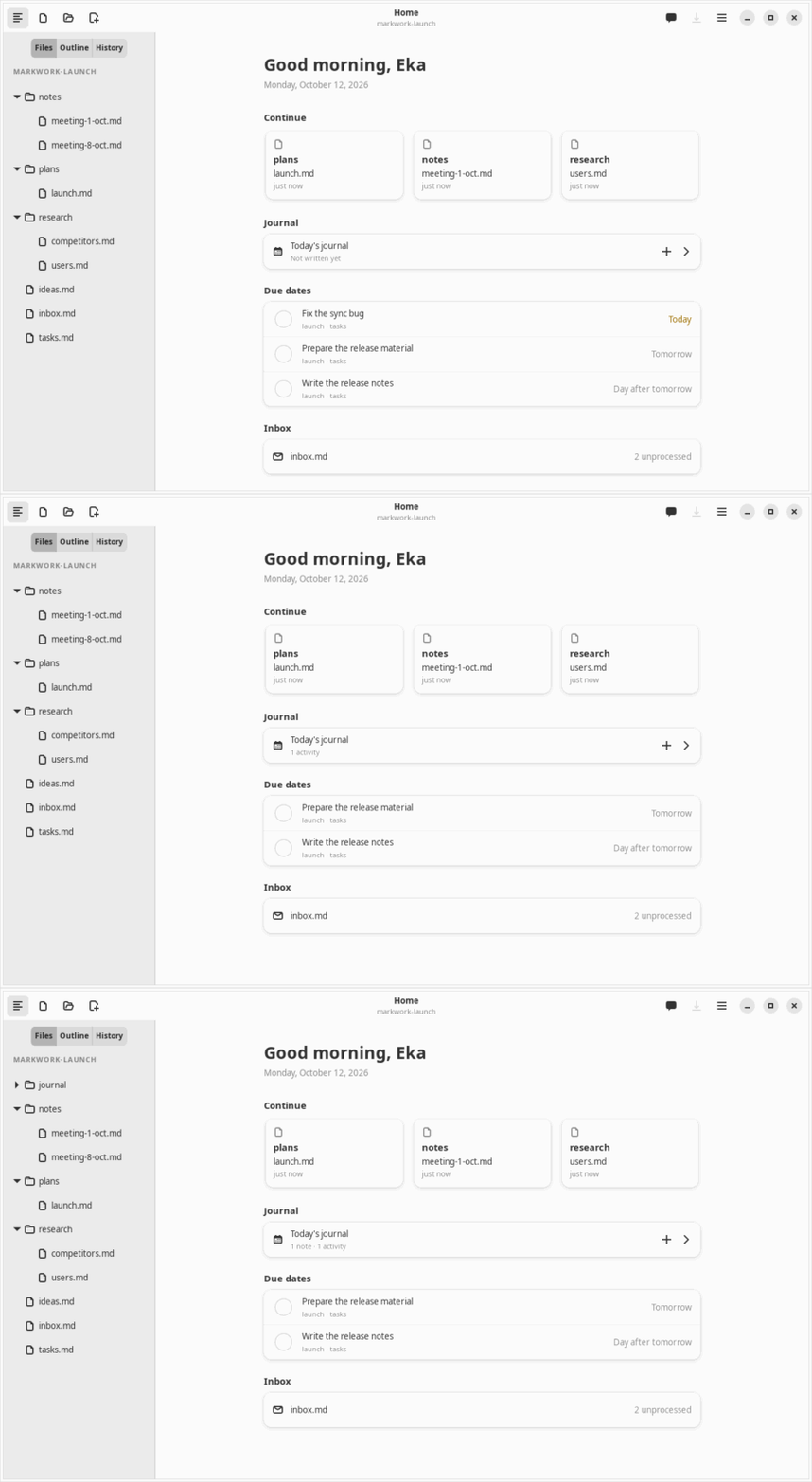
Adw.Clamp keeps the column readable, Gtk.FlowBox wraps the folder cards.src/markdown/, src/agent/, files.ts, git.ts, orchestrator.ts, window/About 5,000 lines import nothing from GObject Introspection, and about 3,400 more use only Gio/GLib. This is deliberate. Code without widgets runs in gjs -m dist/run-tests.js --no-gui in a fraction of a second, has no main-loop timing, and can be read without knowing GTK.
gi://)| Module | What it does | Who draws it |
|---|---|---|
markdown/syntax.ts, inline.ts | Block and inline parsing into markers with offsets | editor/highlighter.ts → tags |
markdown/table.ts, pango.ts | Table model, alignment, edit commands; cell Markdown → Pango markup string | tablelayer.ts, tableedit.ts |
markdown/kanban.ts, inbox.ts, home.ts, journal.ts, wikilink.ts | Parse/serialize the workbench formats; every operation returns a new value | ui/kanban.ts, ui/inbox.ts, ui/home.ts, editor |
markdown/dbml.ts, html.ts, lint.ts, chatmarkup.ts | DBML → Mermaid ER, HTML export, structure checks, chat Markdown → markup | Mermaid layer, export action, agent, chat panel |
editor/offsets.ts | UTF-16 ↔ code point maps, allocation-free word count | Every tag operation |
colors.ts | The light and dark document palettes (plain values) | ui/theme.ts CSS, editor tags, tables, board |
gitlog.ts | Parse git log/diff output into commits and hunks; the agent's Git request types | History tab, diff viewer |
agent/context.ts, tools.ts, changes.ts, batch.ts, harness.ts, commitmessage.ts, … | Context building, BM25, tools, change proposals, preflight, pi prompt/queue, the commit message prompt and budget | ui/chat.ts, proposal viewer (see Learn agents) |
One GJS detail from orchestrator.ts: after GTK is loaded, Gio.Subprocess.get_stdout_pipe() triggers a Gjs-WARNING about Gio.UnixInputStream, so the harness reads its pipes with GLib.IOChannel and writes bytes with an explicit length.
npm run bench without GTK in the way (Learn performance).markdown/ at all: the pure line count went from 2,265 to 2,268 in commit 295d7b9.| Symptom | Cause | Rule |
|---|---|---|
| Crash “Byte index is off the end of the line” | invisible tag in GTK 3 | Hide with the hidden tag at size TINY = 256 |
| Emoji not drawn | Font size 1 Pango unit | Never size 1; 256 is small enough |
| Tag in the wrong place after an emoji | UTF-16 vs code points | makeCpMap() right before touching the buffer |
| 300 ms per keystroke | Remove + reapply tags across the buffer | setTagRanges() / LineTagger |
| “GtkBox is not a child of GtkSourceView” | Removing a TextView overlay in 4.14 | Borrow/return slots from OverlaySlots |
| Images stay put while text scrolls | Overlay offset updated only on allocation | queue_allocate() on every scroll |
| Window cannot shrink | hscrollbar_policy: NEVER forwards the minimum width | Use EXTERNAL |
| Sidebar suddenly expands | hexpand propagates upward in GTK 4 | Explicit hexpand: false on side panels |
| “already disposed” criticals after closing | Idle/timeout outliving the widget; no destroy signal for held widgets | destroy() + destroyed flag, called from unrealize |
| Answer cut off in the chat panel | set_value() inside an adjustment's changed during allocation | Scroll from an idle (stickIdle) |
| Gtk-CRITICAL when dragging a file | A widget as GtkDragIcon | DragSource.set_icon() with a paintable |
| GLib-CRITICAL on exit | Gtk.AlertDialog / destroy_with_parent | Adw.AlertDialog through alert() |
| Ctrl+Z does not bring back the user's draft after the program filled the box | Gtk.TextBuffer.set_text() (like Gtk.Entry.set_text()) is an irreversible action for the undo history; only typing is recorded | Keep the one step yourself: a capture-phase EventControllerKey restores the saved text while the entry still holds what was set, and forgets it on the first edit (MessageWriter) |
| A bundled SVG icon shows as “missing” in tests | No SVG loader for gdk-pixbuf (librsvg) on the test machine, although IconTheme.has_icon() is true | Check the icon's shape separately and report it as not visually verified; never conclude the icon is wrong from that screenshot |
Gdk-CRITICAL gdk_monitor_get_geometry in tests | A popover from a button outside the Xvfb monitor | Keep test windows within 1280×800 |
destroy(), and check a flag in every deferred callback.Related pages: Learn performance (measurements behind Chapters 2–4) and Learn agents (the pure agent/ layer from Chapter 13).